
Your workflow. Your own tool.
Need a calculator, checklist or event helper for your operation? Describe the task by voice or chat. Build the right tool with GastroPilot and save it as your own button.
Reuse what is already known
Your menu, recipes and prices are already saved. Describe what your new helper should do. Start with your operation and save yourself repeated data entry.
Add only what is missing
For an event proposal, add guest count, date, menu choices and any extra work. Existing recipe costs are ready to use. Enter a missing operating figure once, then carry on with the proposal.
Review and save
Marla guides you to a draft. Check that the inputs and result fit the task. Then reopen your helper with one click, save entries and adapt it when your needs change.
A concrete example
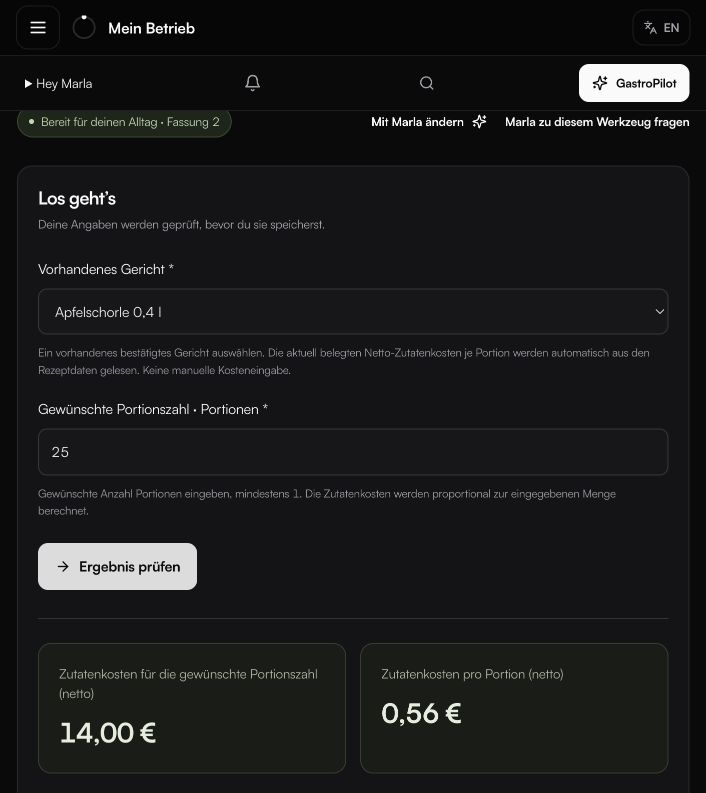
Select a drink from your menu and enter the number of servings. A custom calculator uses the saved recipe to show total quantity and ingredient cost. The original screenshot on this page shows this kind of helper.
Your operation stays in control
You review results and approve important changes. Your helper stays with your operation. Get a solution for your workflow and keep oversight of your information.
EXPLORE MORE
Everything works together.
QUICK ANSWERS
Common questions from daily operations.
What custom tools can I build?
Examples include quantity calculators, checklists, event proposals and operation-specific lists. A tool can reuse stored recipes, prices and master data.
Do I need to enter the same data again?
Existing knowledge from your operation is reused. You add only the details still missing for the specific task.
Do I stay in control of the result?
Yes. You review inputs and output before saving the draft and reopening it later from your own button.
YOUR NEXT STEP
See what becomes possible in your operation.
We’ll show you GastroPilot through real workflows and discuss how to get started.
Book a demo